Configuring Entrances & Doors
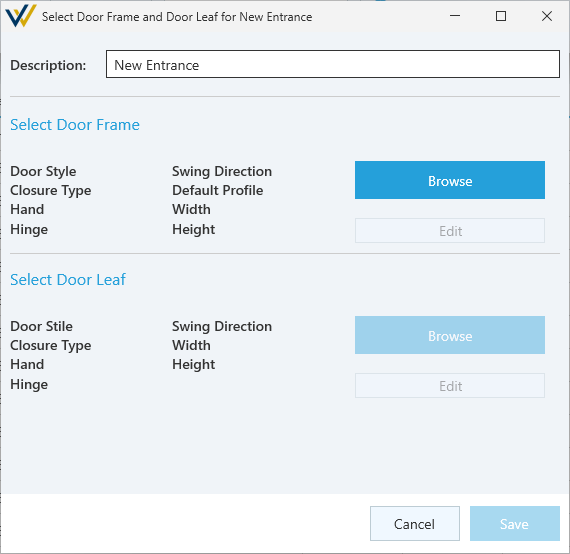
Entrances are the WinBidPro term for the combination of a door frame and door leaf. Configuration options for entrances themselves are limited to a descriptive name and selection of a frame and leaf, with leaves being optional.
-
Description- Required. Description / name of the door leaf. -
Cancel/Save- Confirm or cancel your configuration. -
Select Door Frame
-
Browse- Open the Door Frame catalog for your current vendor. -
Edit- Edit the currently selected Door Frame.
-
-
Select Door Leaf
-
Browse- Open the Door Leaf catalog for your current vendor. -
Edit- Edit the currently selected Door Leaf.
-
Door Frame Configuration
Properties
-
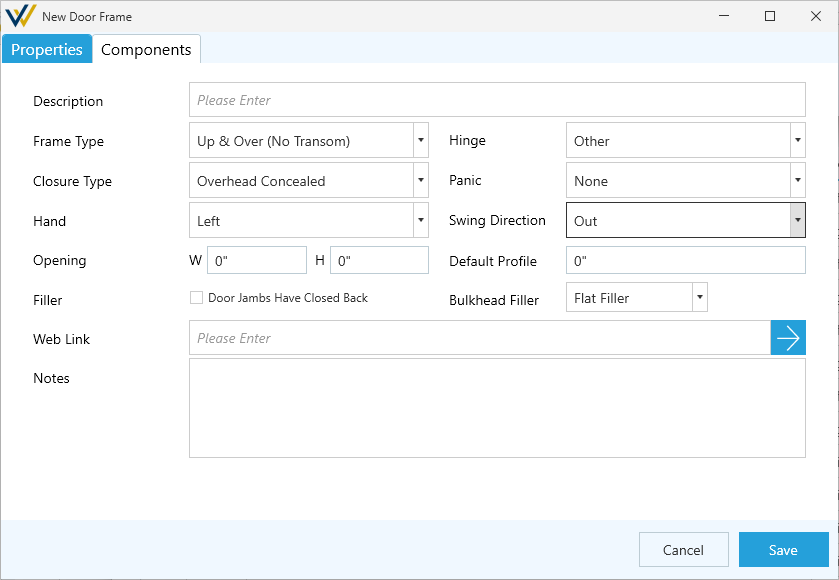
Description- Required. Description / name of the door leaf. -
Frame Type- Options include:Up & Over(No Transom)H-Frame(w/o Transom)Transom(w/ Transom Header)Subframe
-
Hinge- Hinge type. Options Include:OffsetCenterButt HungContinuous GearOther
-
Closure Type- Door Closer. Options include:Overhead ConcealedSurface MountBottom ConcealedOther
-
Panic- Panic hardware. Options Include:NoneRim StrikeSurface Vertical RodConcealed Vertical RodMortise Lock
-
Hand- Door Handing. Options Include:LeftRightPair
-
Swing Direction- Direction of door swing. Options include:InOutBoth
-
Opening:W/H-Wwidth andHheight of the framed opening.
-
Default Profile- Profile height of the extrusions. -
☑
Door Jambs Have Closed Back- Toggle solid back jambs. These typically will require a different filler piece at sidelites and walls. -
Bulkhead Filler- Only whenDoor Jambs Have Closed Backsis not toggled on. How the side of a door jamb handles cut lengths when a sidelite meets a knee wall / bulkhead for a portion of a jamb. Options include:-
Continue Sidelite Filler- Don't interrupt the sidelite filler. -
Flat Filler- Switch your sidelite filler to a flat filler for the height of the bulkhead. -
No Filler- Don't count any filler for the height of the bulkhead.
-
-
Web Link- Option to include a link to the vendor's brochure or webpage for this product. -
Notes- Option to include notes about this door leaf configuration.
Components
-
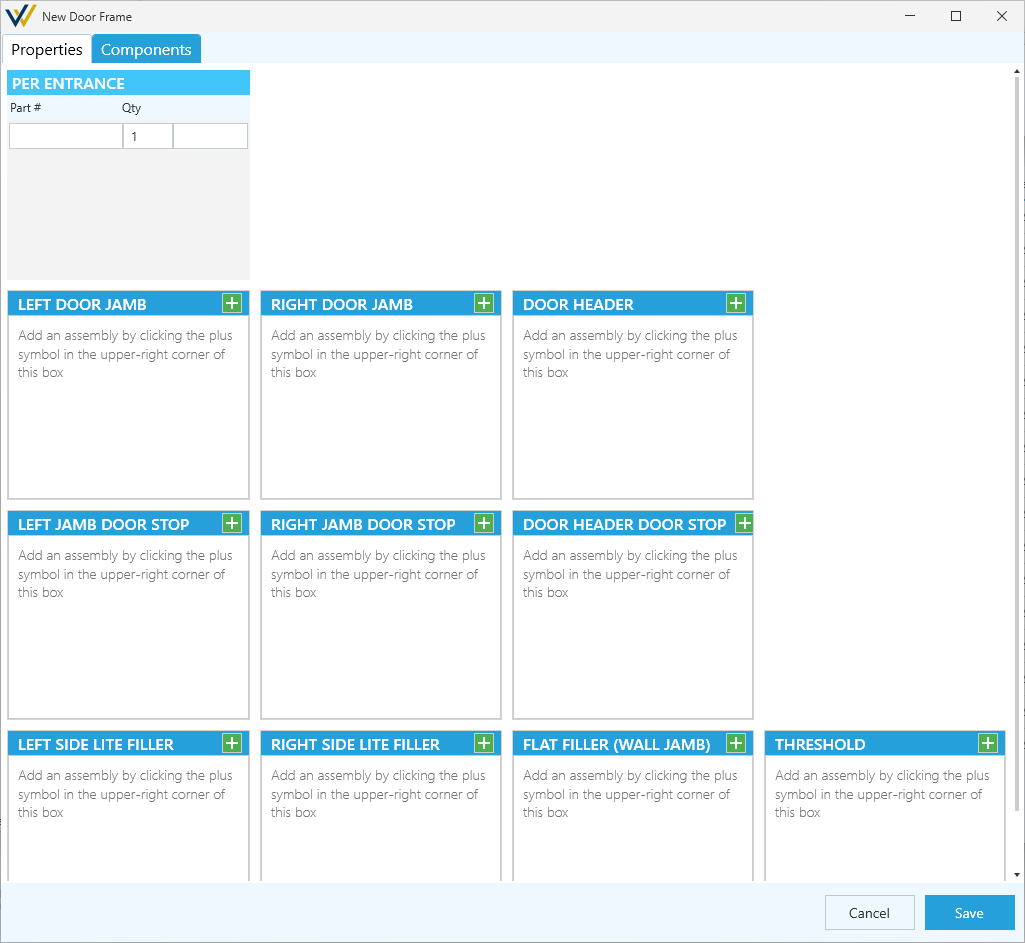
Per Entrance- For each time this door shows up in your job, add these individual parts to your counts. -
Left Door Jamb/Right Door Jamb- Parts that make up the assembly of this frame's left and right jambs.-
Left Door Jamb Stop/Right Door Jamb Stop- Parts that make up the assembly of the left and right jamb's door stops. -
Left Side Lite Filler/Right Side Lite Filler- Parts that make up the assembly of the door jamb's filler for left and right sidelites. -
Flat Filler (Wall Jamb)- Parts that make up the assembly of the door jamb's filler at walls.
-
-
Door Header- Parts that make up the assembly of this frame's header.Door Header Stop- Parts that make up the assembly of the header's door stop.
-
Threshold- Parts that make up the assembly of the threshold.
Cancel/Save- Confirm or cancel your configuration.
Door Leaf Configuration
Properties
-
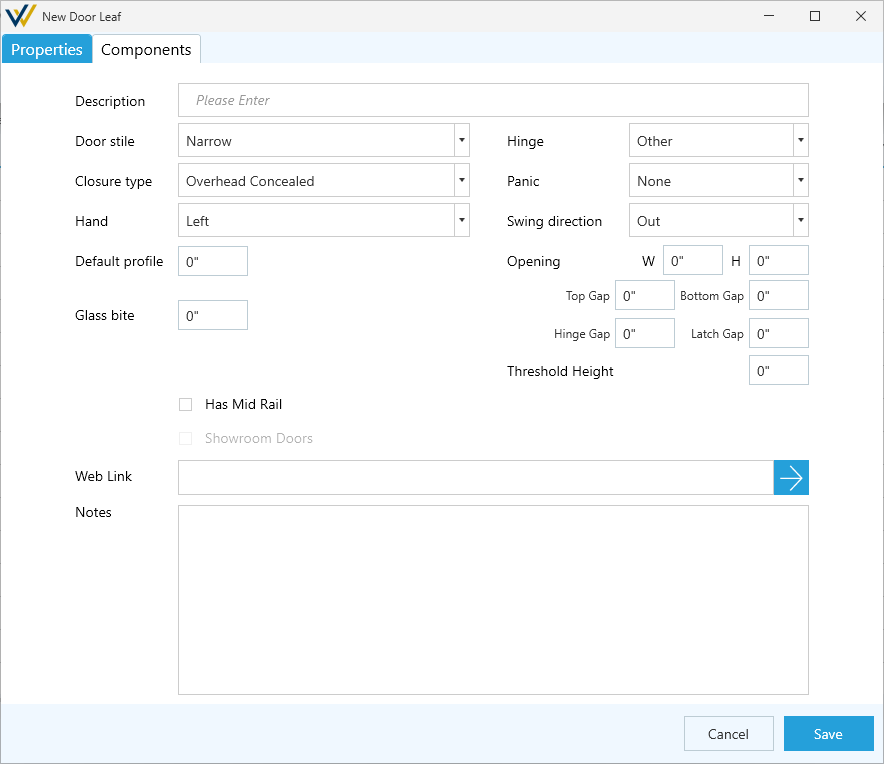
Description- Required. Description / name of the door leaf. -
Door stile- Stile type. Options Include:NarrowMediumWide
-
Hinge- Hinge type. Options Include:OffsetCenterButt HungContinuous GearOther
-
Closure Type- Door Closer. Options include:Overhead ConcealedSurface MountBottom ConcealedOther
-
Panic- Panic hardware. Options Include:NoneRim StrikeSurface Vertical RodConcealed Vertical RodMortise Lock
-
Hand- Door Handing. Options Include:LeftRightPair
-
Swing Direction- Direction of door swing. Options include:InOutBoth
-
Default Profile- Sets the dimension of the top rail and stiles to this dimension if not configured in the components tab. -
Opening- Details of the framed opening this leaf is expected to be included in. Used to pre-filter options.-
W- Width of the framed opening. -
H- Height of the framed opening. -
Top Gap/Bottom Gap/Hinge Gap/Latch Gap- Dimension in inches of the gap between the door leaf and the door frame / threshold at the top, bottom, hinge-side and latch-side of the door panels. -
Threshold Height- Expected height of the threshold.
-
-
Glass Bite- Dimension in inches of the glass bite. -
☑
Has Mid Rail- Toggle mid component and settings.Mid rail height- WhenHas Mid Railis toggled on, set theHheight of the mid rail.
-
☑
Showroom Doors- Only on pair doors. Toggle setting left and right door leaves widthsL/R- Set the width for theLleft andRright door leaves. If theOpeningWwidth is set, typing in one width will automatically fill in the other.
-
Web Link- Option to include a link to the vendor's brochure or webpage for this product. -
Notes- Option to include notes about this door leaf configuration.
Components
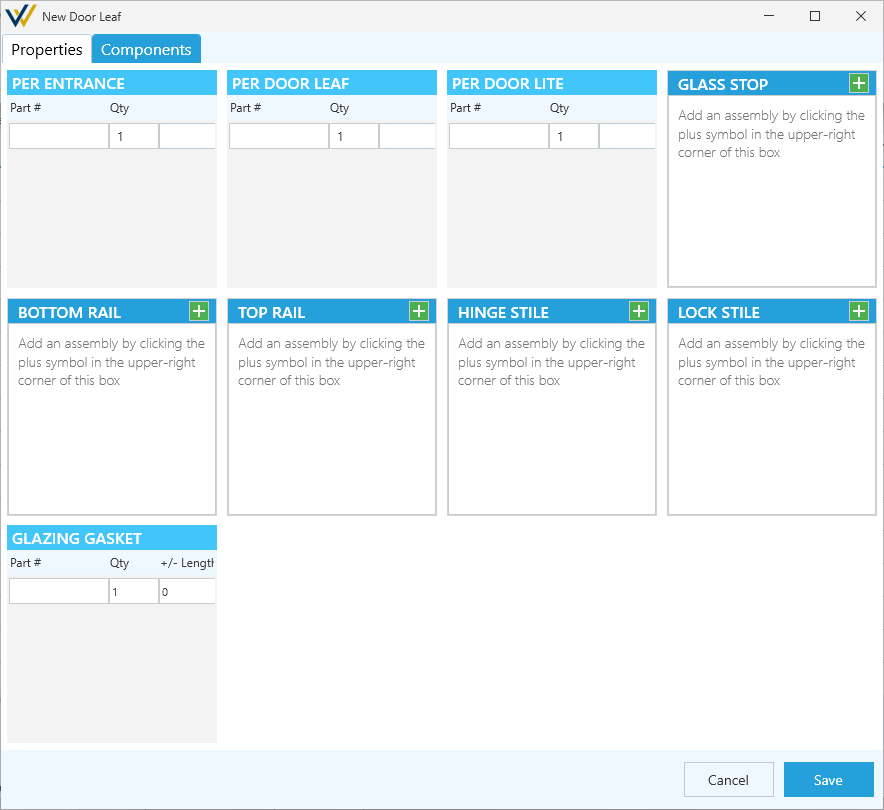
-
Per Entrance- For each time this door shows up in your job, add these individual parts to your counts. -
Per Door Leaf- For each time this door shows up in your job, add these individual parts to your counts per door leaf. -
Per Door Lite- For each time this door shows up in your job, add these individual parts to your counts per glass lite in the door leaf. -
Glass Stop- Parts that make up the assembly of this leaf's glass stops. -
Bottom Rail- Parts that make up the assembly of the bottom rail. -
Top Rail- Parts that make up the assembly of the top rail. -
Hinge Stile- Parts that make up the assembly of the hinge-side stile. -
Lock Stile- Parts that make up the assembly of the lock-side stile. -
Glazing Gasket- Measures the perimeter of the DLO + Glass Bite for each glass panel in an elevation to generate the length of these parts.
Cancel/Save- Confirm or cancel your configuration.