Configuring Framing Systems
This section goes into detail on customizing and building out new framing systems, including tips for specific system conditions, like SSGs.
Changes made to framing systems will effect your shop drawings and final reports. It's important to know what configurations are possible, and that they're set up correctly before using them on an active job.
Framing System Settings
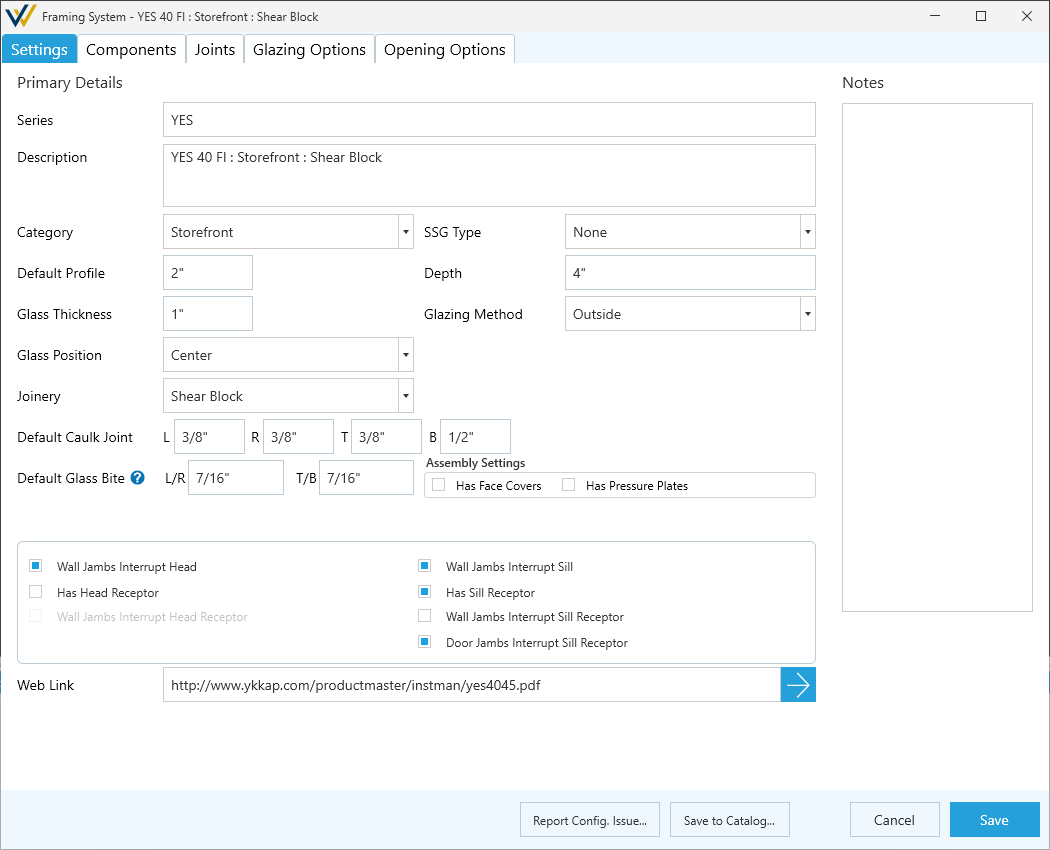
-
Series- The make or product line this system is part of. -
Description- A brief description of the specific system being configured to help distinguish it in a list view.- Example -- [Series] : Storefront : Screw Spline : Thermal : Center Set : Outside Glaze
-
Category- Type of system. Options include:StorefrontWindow WallCurtain WallFrameless PartitionWindowOther
-
SSG Type- Type of structural silicone glazed system, if relevant. Options include:None- Typical for non-curtain wall systems.Vertical SSGHorizontal SSG4-Sided SSG
-
Default Profile- System profile measured in inches from the bottom edge to the top edge of the frame assembly in section. -
Depth- System depth measured in inches from the outside face to the inside face in section. -
Glass Thickness- Default thickness of the glass product used for this system. -
Glazing MethodOutside- For use in exterior applications.Inside- For use in interior applications.Other- Edge cases and specialties.
-
Glass Position- Position of glass lites within the framing system. Options include:CenterOffsetFrontBackOther
-
Joinery- Method of assembly. Options include:Screw SplineShear BlockCan/StickMixedOther
-
Default Caulk Joint- Default depth / thickness of caulk joints along the perimeter of the system. Can be overwritten per elevation in the Elevation tool tab.L- Caulk joint at the left jamb.R- Caulk joint at the right jamb.T- Caulk joint at the top / head.B- Caulk join at the bottom / sill.
-
Default Glass BiteL/R- Glass bites size at the vertical edges (Left / Right) of the DLO.T/B- Glass bites size at the horizontal edges (Top / Bottom) of the DLO.
-
Assembly Settings- Toggle whether to include face covers and pressure plates in the system configuration.- ☑
Has Face Covers - ☑
Has Pressure Plates
- ☑
The following toggles options can differ between systems, and will effect cut lengths based on how the system comes together.
- ☑
Wall Jambs Interrupt Head - ☑
Wall Jambs Interrupt Sill - ☑
Has Head Receptor - ☑
Has Sill Receptor - ☑
Wall Jambs Interrupt Head Receptor - ☑
Wall Jambs Interrupt Sill Receptor - ☑
Door Jambs Interrupt Sill Receptor
-
Web Link- A link to the product page on the vendor's website or a download link for vendor catalog / installation instructions. -
Notes- A place to freely add notes about the system.
-
Report Config. Issue...- Use this button to report an issue with the system to GDS. -
Save to Catalog...- This button will add these changes to your vendor catalog.- See Local & Global Edits for more details.
Cancel/Save- Discard or save the changes made on the Settings page.