Cut List & Glass Labels
This page goes over creating cut and glass labels based on your Cut List and Glass reports.
You can reach this window by clicking Reports > Cut List & Glass Labels in the main menu.
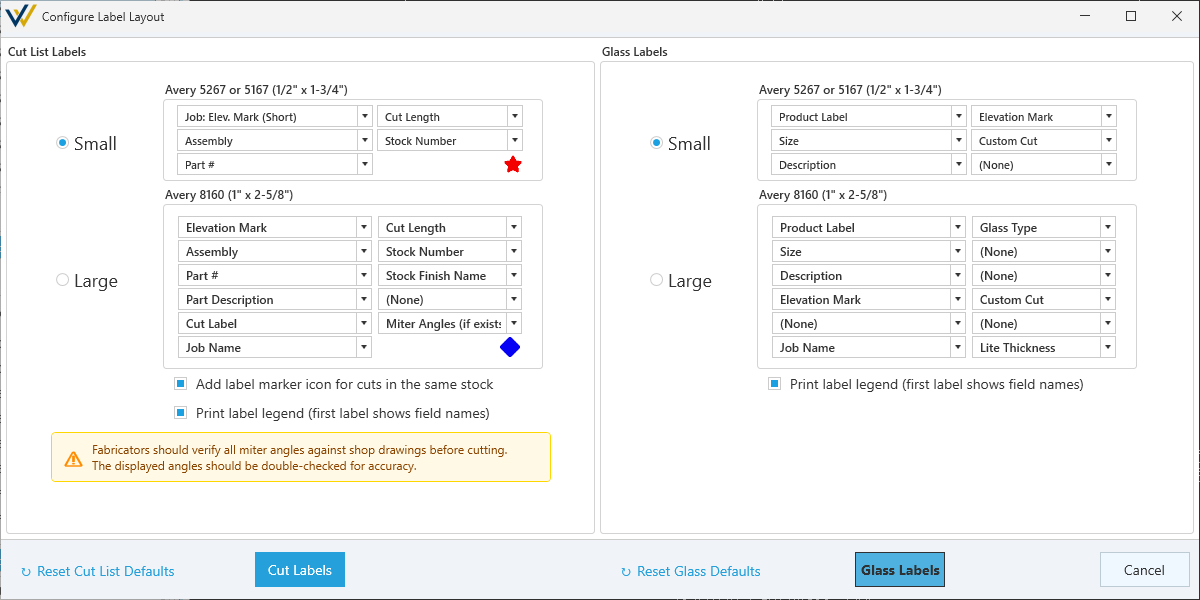
Cut List Labels
Options
-
🔘
Small- Select to change the output to small labels (1/2" x 1-3/4"), for example - Avery 5267 or 5167.- Includes 5 configurable slots for cut list values and a marker for cuts that share a stock.
-
🔘
Large- Select to change the output to large labels (1" x 2-5/8"), for example - Avery 8160.- Includes 11 configurable slots for cut list values a marker for cuts that share a stock.
-
☑
Add Label marker icon for cuts in the same stock- Toggle same stock markers. -
☑
Print label legend (first label shows field names)- Toggle the first label printed as a reference key for label values.
Fabricators should verify all miter angles against shop drawings before cutting. The displayed angles should be double-checked for accuracy.
Output
-
Cut Labels- Click to review and print the output.-
☑
Display Marker- Toggle stock marker display in the printed version. -
Format of Imperial Measurements- A drop menu to select measurement format with options for:-
Fractional- Ex. 1 1/2" -
Decimal- Ex. 1.5"
-
-
-
Reset Cut List Defaults- Click to reset all cut label settings to the default.
Glass Labels
Options
-
🔘
Small- Select to change the output to small labels (1/2" x 1-3/4"), for example - Avery 5267 or 5167.- Includes 6 configurable slots for glass report values for each glass pane.
-
🔘
Large- Select to change the output to large labels (1" x 2-5/8"), for example - Avery 8160.- Includes 12 configurable slots for glass report values for each glass pane.
-
Print label legend (first label shows field names)- Toggle the first label printed as a reference key for label values.
Output
-
Glass Labels- Click to review and print the output.-
Format of Imperial Measurements- A drop menu to select measurement format with options for:-
Fractional- Ex. 1 1/2" -
Decimal- Ex. 1.5"
-
-
-
Reset Glass Defaults- Click to reset all glass label settings to the default.